 proverik
Workflow comparison
Media.io vs OpenArt for product video
For a text-only mock-up, start in Media.io. For a product shot that needs a reference photo, 16:9 framing and an audio switch in the same form, start in OpenArt.
Our recordings stop at sign-in, before either editor rendered the shot. The finished films below come from their creators.
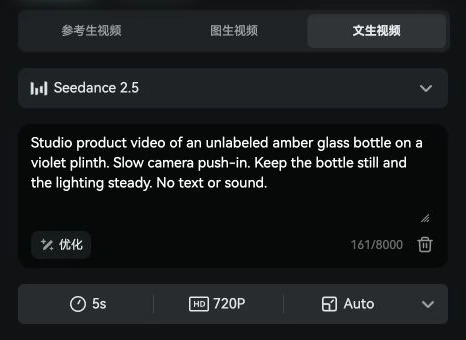
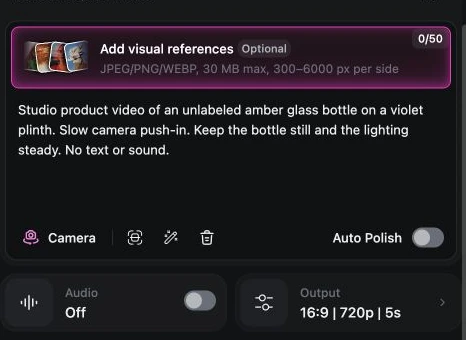
One bottle, two ways to frame it
Put an amber bottle on a violet plinth and move the camera slowly toward it. The bottle should stay still. On a product page, even a small change to its silhouette can make an otherwise smooth shot unusable.
In Media.io, we switched from Image to Video to Text to Video. Seedance 2.0 Mini was already selected. We changed it to Seedance 2.5, raised the resolution from 480p to 720p and left the duration at five seconds. That put nearly every decision in one row. We left framing on Auto and asked for silence in the prompt. Clicking Generate brought up the Wondershare account screen.
OpenArt started us on Wan 3.0. After switching to Seedance 2.5, we could add a reference image in the same form, see 16:9 in the output settings and switch audio off. We left the reference slot empty so both editors received the same text. Create for Free took us to sign-in. The Media.io session opened in Chinese and OpenArt in English. The recordings have English captions.
For a rough idea, Media.io’s short form was enough. For a brand shoot, the empty reference slot changes our choice. A written description can say “amber glass,” but it can’t show the exact slope of a particular bottle’s shoulders. OpenArt lets us bring that information into this setup. Media.io also offers reference and image modes, visible in its recording.
Read the exact prompt
Studio product video of an unlabeled amber glass bottle on a violet plinth. Slow camera push-in. Keep the bottle still and the lighting steady. No text or sound.
What a month of video costs
We switched both pricing pages to monthly billing in US dollars on November 18, 2026. The two entry plans were $1.99 apart. A Media.io credit and an OpenArt credit buy different amounts of work, so the apparent twentyfold gap in the balances tells you little about how many takes you can afford.
| Monthly billing | Media.io Standard | OpenArt Starter |
|---|---|---|
| Price displayed | $15.99/month | $14/month |
| Included balance | 200 credits/month | 4,000 credits/month |
| Vendor’s video estimate | Up to 20/month | Up to about 50/month, excluding Director |
| Watermark | Watermark-free 1080p export listed | Watermark-free listed |
Suppose you buy one month solely for a pitch and deliver three clips. If the included balance covers every attempt, the subscription works out to $5.33 per delivered clip on Media.io or $4.67 on OpenArt, before tax. That is a budgeting example. The signed-out editors gave us no actual Seedance charge. OpenArt also says it usually credits back a failed job. A render that finishes with a warped bottle may still cost you a second take.
Two films and the people who made them
Both filmmakers posted their finished work and production notes on Reddit. Watch the cuts between stills in the first film, then follow the same characters across scenes in the second. Those are the jobs each creator trusted the software to do.
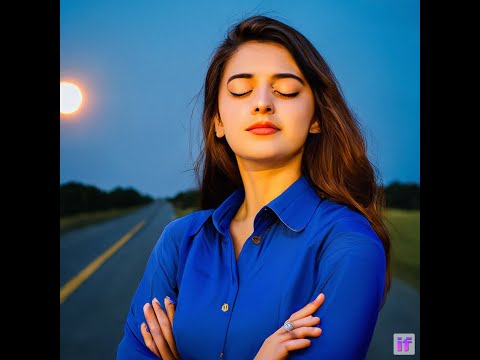 Watch film
A film cut by hand in Media.io
In r/StableDiffusion, u/RageshAntony explained that DeepFloyd and Stable Diffusion supplied the images, ElevenLabs supplied the narration, and they cut the film by hand in Media.io. The author points out that faces and clothing changed between generated stills. Watch the cuts between those stills to see the assembly work. Their account places the continuity problem upstream of Media.io.
 Watch film
Four characters across 24 OpenArt shots
In r/aifilmmaking, u/Sensitive_Proof_3937 described building four character assets for What She Knew, a three-minute thriller. They checked each composition as a still before spending credits on motion. They liked how well the wardrobe survived changes in lighting, but found Director chat consumed credits during revisions. The finished film gives you a way to judge continuity across cuts for yourself.
Two examples using Seedance 2.5
For a closer match to the model in our recordings, Create With AI shows a Media.io action sequence built from character and scene references, then enhanced and extended. The video description promotes Media.io. On Reddit, u/Capable_Run_1993 posted an OpenArt meteor scene with a character sheet and eight timed shots. The creator liked the dust effects but called the running “a bit floaty.” The two briefs differ, so watch them for technique rather than using them to rank picture quality.
Where users lost time or credits
Two questions came up in the public accounts we read: does the motion follow the brief, and what happens to the balance when something goes wrong? These are individual experiences. Each link goes to the original account so you can read the replies.
Media.io and an unexpected background actor
“It often did just the opposite of my prompts”
u/Doggyman1202
This first-time user liked the realistic motion Media.io gave a still photo. In one take, a horse turned toward the camera with the face of a bull. The post concerns image-to-video and leaves the model unnamed. It’s a good reason to inspect the background as well as the product before keeping a take.
OpenArt and the cost of correcting one detail
“OpenArt reached out to me about this issue and reimbursed all of my credits”
u/justcallmerain, in an update
u/justcallmerain wanted Director to correct a character’s beard. They said the correction triggered another scene plan and reference images, costing nearly 2,000 more credits. This was a multi-step Director project, a different purchase decision from running one prompt in the video editor.
Two billing experiences on Trustpilot
Dharma Steve reported two Media.io payments with no credits showing. Wondershare requested the order numbers and account email. The public exchange ends there. On OpenArt, Kyle said support replied in about half an hour about a duplicate charge they attributed to their own mistake. That review records a response time for one customer.
Which editor fits your brief?
If the shot is for a pitch deck, start with the Media.io form. You can set the camera move in a sentence, choose the duration and resolution together, and leave the framing on Auto. Its appeal here is how few decisions stand between the idea and a prepared shot.
For a client who has already approved a particular pack shot, try OpenArt first. Bring the approved photograph into the reference slot, select the delivery aspect ratio and set the audio switch before you render. For a longer story, the filmmaker behind What She Knew offers a useful variation. Approve a still for each scene before spending the video budget.
We’d make the first purchase decision on those workflow differences. A claim about the sharper product label, smoother camera move or cheaper usable take would need matched exports and actual credit receipts from both sites.